Vinci Convert: converting MP4 for DaVinci Resolve on Linux
Introduction
Anyone who has used DaVinci Resolve knows that, nowadays, it is one of the best video editors on the market especially for a free software, with an impressive experience.
However, using DaVinci Resolve on Linux is a real struggle.
Right off the bat, just getting the application to open is a challenge: you need to install the right drivers and a whole set of dependencies.
But the real problem shows up with codecs and MP4 files.
The problem
On Linux, Resolve simply refuses to work properly with certain codecs.
MP4 files, which work without a hitch on other platforms, can freeze the project before it even starts.
The solution
With that in mind, I found a script that used ffmpeg to convert MP4 videos to the MOV format, which has much better compatibility on Linux.
But of course: running that script by hand every time is a pain.
That’s when, since I wanted to test Kimi-K3, I decided to give it a chance on this journey.
Solution steps
So, we defined the following steps for the solution:
Requirements gathering
The first step was to understand exactly what the tool needed to do.
Prototyping
I did the prototyping using Pencil with some AI agent.
Coding
I combined spec driven development with opencode. For that, I chose to use openspec + opencode + Kimi 3.
Installers
Finally, I generated the installers for Linux and Windows, using AppImage and .exe.
About the solution
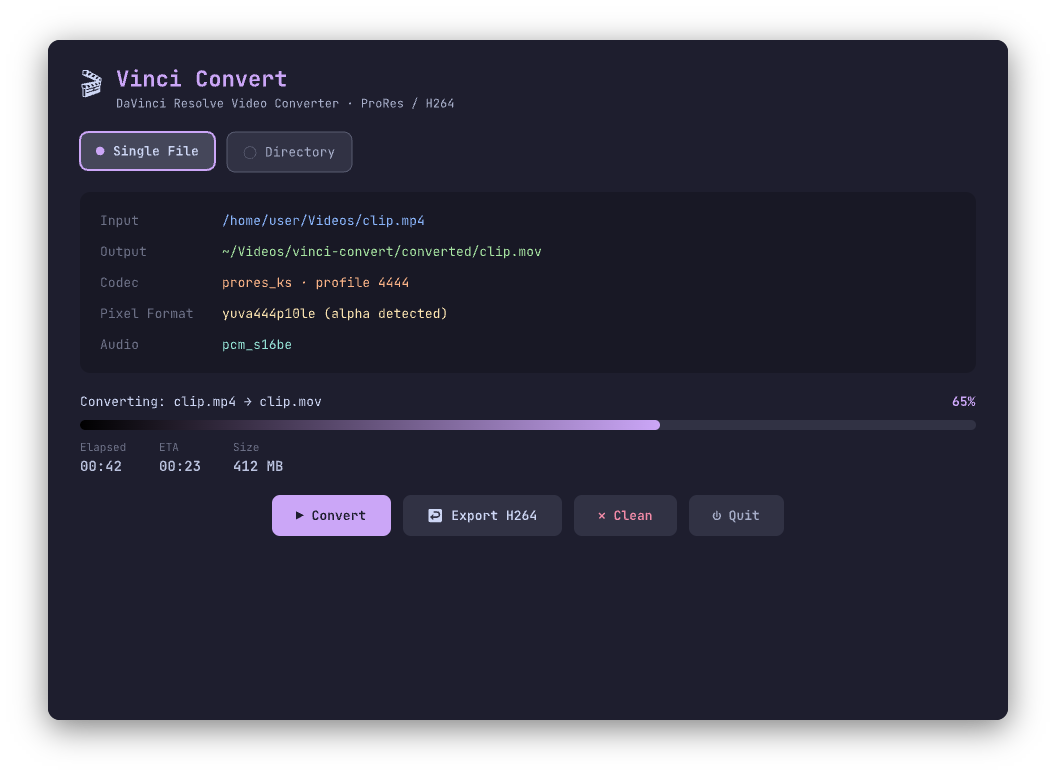
Vinci Convert is a Python reimagining of davinconv (a bash script by Gohny), but with extra features: a terminal interface with live progress, a desktop app in PySide6, recursive directory scanning, and modern Python tooling via uv.
Features
- Convert single files or entire directories (recursively) to ProRes;
- Automatic pixel format detection — switches between ProRes HQ (422), ProRes 4444 (with alpha) or direct stream copy;
- Export back to H264 for delivery;
- Catppuccin Mocha Theme — in both the TUI and the GUI;
- Two interfaces: a CLI with
rich/typerand a desktop window in PySide6; - Built on top of ffmpeg / ffprobe — no quality loss in copy mode.
The conversion logic probes the source with ffprobe, detects the pixel format, and picks the correct ProRes profile:
- Alpha (
yuva/rgba),.mov12-bit → direct stream copy; - Alpha (
yuva/rgba) →prores_ksprofile 4444 (yuva444p10le); - Standard →
prores_ksprofile 3 HQ (yuv422p10le).
Audio is always encoded as pcm_s16be (uncompressed, Resolve-friendly).
Project structure
vinci-convert/
├── pyproject.toml
├── README.md
├── .github/workflows/
│   └── release.yml      # CI: builds AppImage + Windows installer, publishes releases
├── packaging/
│   ├── cli_launcher.py  # PyInstaller entry scripts
│   ├── gui_launcher.py
│   ├── vinci-convert.spec       # PyInstaller spec (CLI)
│   ├── vinci-convert-gui.spec   # PyInstaller spec (GUI)
│   ├── generate_icons.py        # icon generator (QPainter, Catppuccin)
│   ├── assets/                  # vinci-convert.png / .ico generated
│   ├── linux/                   # AppRun, .desktop, AppStream metadata, AppImage script
│   └── windows/
│       └── installer.iss        # Inno Setup installer
└── src/vinci_convert/
    ├── __init__.py
    ├── __main__.py      # python -m vinci_convert
    ├── cli.py           # CLI in Typer
    ├── converter.py     # ffmpeg logic (shared between CLI and GUI)
    ├── theme.py         # Catppuccin palette (Rich terminal)
    ├── tui.py           # live progress UI in Rich (CLI)
    ├── qss.py           # Catppuccin palette + QSS stylesheet (GUI)
    ├── workers.py       # ffmpeg workers in QThread (GUI)
    └── gui.py           # desktop window in PySide6 (GUI)
Technologies used
- Python ≥ 3.11 — main language;
- uv — dependency management and CLI installable;
- PySide6 — desktop application;
- Typer + Rich — CLI and live terminal progress;
- ffmpeg / ffprobe — video conversion and probing;
- PyInstaller — binary packaging;
- Inno Setup — Windows installer;
- AppImage — portable Linux installer;
- GitHub Actions — CI to build and publish releases.
Is it worth it?
If you work with DaVinci Resolve on Linux, the answer is yes.
The codec and MP4 issue is a real and recurring obstacle, and having your own tool that solves it with a single click completely changes the workflow.
And the best part: in the process, I also got to test Kimi-K3, which proved to be a great companion throughout the journey — from requirements gathering to installer generation.
References
https://github.com/Jhonatanmizu/vinci-convert
https://github.com/gohny/davinconv